Ergonomics on the Road: How to Stay Safe and Comfortable in Mobile Work Environments

Key Takeaways:
- Addressing common ergonomic risks like poor posture and repetitive motion helps prevent workplace injuries.
- A well-designed home or office workstation supports productivity and employee well-being.
- Encouraging healthy habits such as stretching and movement throughout the workday can help reduce injury risk.
Ergonomics in the workplace must go beyond ergonomic workstations to factor in the needs of a mobile workforce. Drivers and other employees who travel frequently – such as salespeople, field services representatives and executives – may face ergonomic risks tied to prolonged driving, handling tools and equipment at a worksite, and working remotely in hotel rooms or other temporary spaces.
An ergonomics program that factors in mobile workers is crucial because ergonomic injury, also known as musculoskeletal disorders (MSDs), costs U.S. employers $18 billion a year, with an injured employee taking a median 14 days off from work. 1
Employers play a key role in reducing the potential for employee injury and associated workers compensation costs, and employer support is key to ergonomic injury prevention.
The hidden cost of musculoskeletal disorders in the workplace
Musculoskeletal disorders represent one of the most significant yet preventable workplace health challenges facing employers today. These injuries affect individual employees while also impacting productivity, increasing costs and disrupting operations across entire organizations.
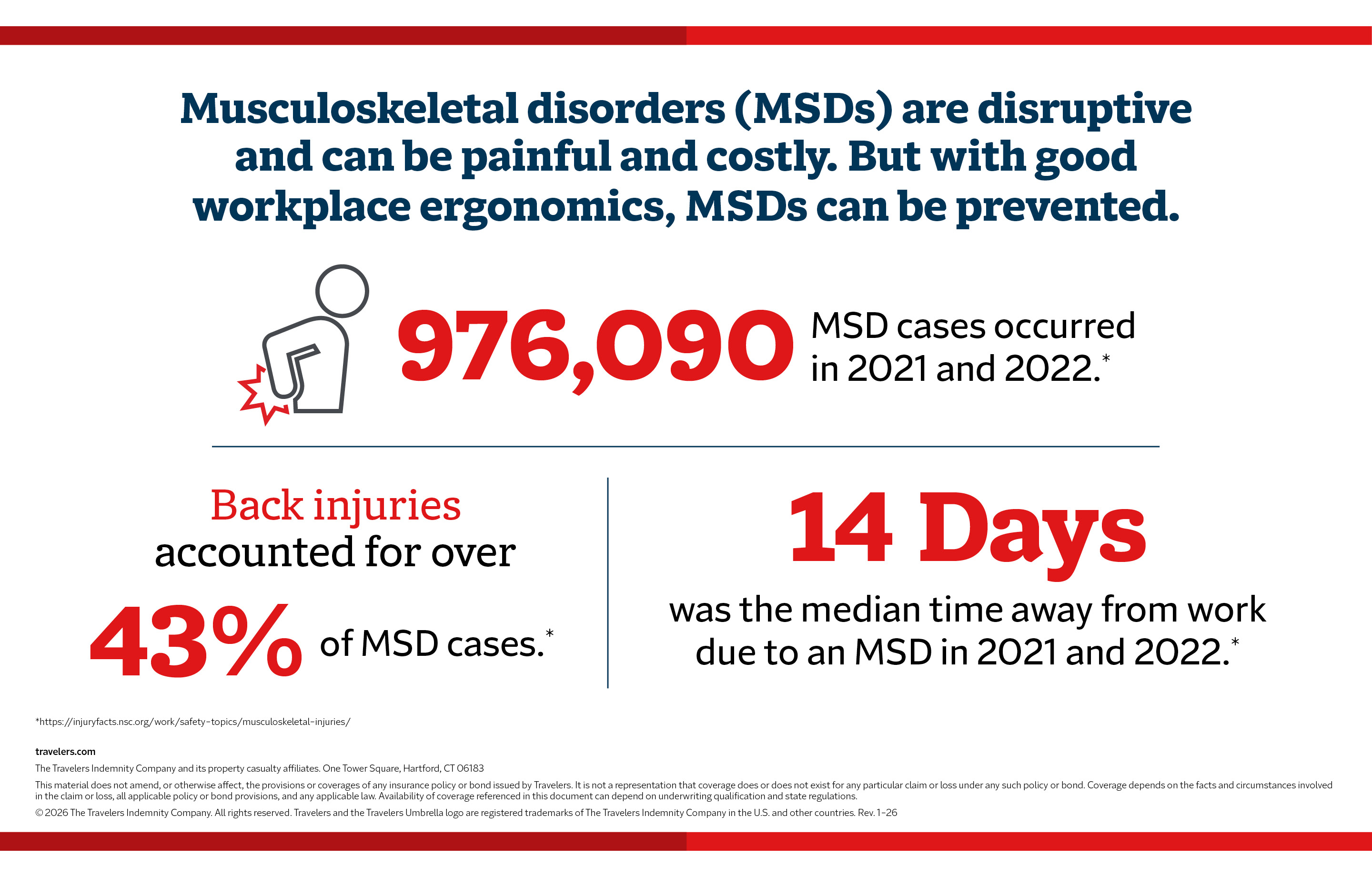
Musculoskeletal disorders (MSDs) are disruptive and can be painful and costly. But with good workplace ergonomics, MSDs can be prevented.
976,090 MSD cases occurred in 2021 and 2022.*
Back injuries accounted for over 43% of MSD cases.*
14 days was the median time away from work due to an MSD in 2021 and 2022.*
*https://injuryfacts.nsc.org/work/safety-topics/musculoskeletal-injuries/
travelers.com
The Travelers Indemnity Company and its property casualty affiliates. One Tower Square, Hartford, CT 06183
This material does not amend, or otherwise affect, the provisions or coverages of any insurance policy or bond issued by Travelers. It is not a representation that coverage does or does not exist for any particular claim or loss under any such policy or bond. Coverage depends on the facts and circumstances involved in the claim or loss, all applicable policy or bond provisions, and any applicable law. Availability of coverage referenced in this document can depend on underwriting qualification and state regulations.
© 2026 The Travelers Indemnity Company. All rights reserved. Travelers and the Travelers Umbrella logo are registered trademarks of The Travelers Indemnity Company in the U.S. and other countries. Rev. 1-26
The unique ergonomic challenges of a mobile workforce
Workplace ergonomics typically involves providing well-designed, often adjustable workstations and training employees on healthy work habits. Employees on the road can face additional injury risks related to prolonged sitting and awkward postures in vehicles, fatigue and the use of mobile technology, such as laptops and tablets, and completing administrative tasks while parked. These situations can present additional challenges for employers beyond the typical office environment.
MSDs do not generally develop all at once and can occur from months or years of poor workstation design and unhealthy habits. For commercial vehicle drivers, the risk of at-fault collisions has been shown to increase when drivers experience MSDs and other types of chronic conditions.2
A good ergonomics program that reduces MSD risk factors for mobile employees, such as awkward postures, repetition and high-force material handling, can reduce injuries, create a healthier, more engaged workforce and save money for employers.
Ergonomics for drivers
Drivers face a higher risk of ergonomic injury due to ergonomic risks posed by spending extended periods in a vehicle. While office workers may be able to use work chairs for back pain, for example, it is not quite as simple for drivers and road warriors. There are strategies that can enhance the working conditions for drivers while reducing risks behind the wheel.
Choose the right vehicle for safety and ergonomics.
Employers play a vital role in protecting the health and safety of their mobile workforce through thoughtful vehicle selection. Ergonomic vehicle design directly impacts driver comfort, fatigue and long-term musculoskeletal health. When purchasing or assigning vehicles, employers should prioritize models and features that support neutral postures and minimize strain.
Look for vehicles that provide:
- Spacious interiors and high adjustability in seats, steering wheels, pedals and mirrors to accommodate drivers of varied sizes.
- Supportive seating that properly fits the driver’s back, shoulders and thighs, reducing pressure points and promoting good posture.
- Easy access to controls so drivers can operate pedals, steering and instrumentation without leaning or twisting.
For operators of large equipment – such as trucks, delivery vans or construction vehicles – employers should ensure that vehicles are equipped with advanced vibration-absorbing seats to reduce Whole-Body Vibration (WBV). These seats help minimize road shock and protect drivers from fatigue and chronic back conditions. Employers should also establish a maintenance and replacement schedule for these seats to ensure continued effectiveness.
By choosing ergonomically sound vehicles and accessories, employers can take a proactive step in reducing injury risk, improving driver comfort and supporting a healthier, more focused workforce.
Tips for driver safety: How to adjust vehicle seats and steering.
Once a vehicle is chosen, proper adjustment is necessary to help minimize strain. Instruct drivers to adjust the seats and accessories appropriately.
The position of the vehicle seat pan should allow the thighs to sit evenly with two to three finger widths between the backs of the knees and the edge of the seat. Your drivers should set the angle of the seat back at 90 to 110 degrees from the seat pan and use lumbar support 2 to 4 centimeters in depth to help reduce the chance of back pain.3 Make sure drivers position the side and rearview mirrors to allow them to check the sides and rear of the vehicle without moving their heads.
Minimize vibration and fatigue.
WBV transmitted through the seat and floor, is a major ergonomic hazard for anyone who spends lengthy periods of time behind the wheel. Research shows that as little as 20 minutes of full-body vibration exposure slows driver reaction time, leading to an increased risk of accidents.4
For drivers of large equipment (such as trucks or construction vehicles), specialized, advanced vibration-absorbing seats with air-ride or mechanical suspension systems are highly effective at minimizing road shock and engine rumble, protecting the spine from chronic issues, back pain and accelerated fatigue. In addition to using effective equipment, it is crucial for drivers to adopt active habits behind the wheel. Drivers should use seat cushions to help absorb minor vibrations, shift posture often while driving and take regular breaks to stop, get out of the vehicle and stretch.5
Position mobile devices safely.
Mobile devices are a necessary business tool for any road warrior. To keep drivers safe, implement policies that prohibit the use of talking and texting while driving and help ensure that mobile devices are safely positioned, allowing drivers to easily glance at the GPS without straining or performing awkward reaches. Finally, make sure that the positioning of your device allows a clear view of the road, which is required by law in some states.6
Managing luggage and equipment.
Instruct employees on safe loading and unloading of luggage, equipment, tools and other items used at the worksite. Encourage workers to load and unload materials safely to minimize ergonomic risks. Use safe lifting practices and reduce luggage weights wherever possible. Additionally, when equipment, tools and other supplies are handled at the workplace, provide manual handling aids – such as dollies, carts and mobile-powered lifts – to reduce the potential for back and shoulder injuries. Back and shoulder injuries remain a significant concern: 24% of work-related injuries over the past five years have involved the back and shoulders, according to the Travelers 2025 Injury Impact Report.7
Healthy habits while traveling
Ergonomics at work also involves healthy practices, which apply to travelers and road warriors as well as to employees who spend most of their time in an office. Healthy movement is an important way to reduce ergonomic hazards at work. Here are the main healthy ergonomic practices for mobile employees:
- Regular stops – Stopping every two to three hours for a short break can help to reduce muscle stiffness, increase blood flow and prevent ergonomic injuries.8
- Stretching – Learning a simple stretching routine that addresses the whole body can help to promote blood circulation and muscle health. Stretches that may be helpful include neck rolls, shoulder rolls, wrist stretches, knee raises and ankle rolls.9
- Hydration – Staying well hydrated is critical while on the road. Research has shown that dehydrated drivers are more likely to make driving errors, which may increase the risk of accidents.10
- Movement – Movement can be helpful both in the vehicle and during breaks. While driving, you can shift positions slightly and stretch your legs while using cruise control. When you stop, it’s important to get out of the vehicle, walk, stand and stretch during breaks.11
Recovery is important to prevent long-term strain in frequent travelers, drivers and other mobile employees. Breaks during drives and between trips promote blood circulation, reduce muscle fatigue and help to prevent strain and MSD injuries.
Support a mobile workforce with training and tools.
Employer-provided guidance is key to ergonomics in the workplace and reducing ergonomic risk factors. Employers can support their employees by providing training that encompasses the unique needs of mobile workers. They should also consider providing ergonomic travel kits, seat cushions and safe lifting aids. Finally, it is key to consider mobile workers when drafting organizational policies supporting safe travel.
A good ergonomics program that addresses traveling workers is an essential part of risk management for any company. Risk managers should consider partnering with Travelers to help reduce MSD injuries in the workplace and on the road.
Partner with Travelers for mobile workforce safety.
A good ergonomics-in-the-workplace program considers the unique needs of a mobile workforce to help reduce ergonomic injury to drivers and frequent business travelers. The benefits of proper ergonomics for traveling employees include fewer claims, reduced absenteeism, improved morale and a boost to the company’s bottom line through reduced workers compensation claims and costs.
To discover how Travelers can support your risk management strategy with ergonomic solutions for your on-the-go workforce, connect with your Travelers representative.
Sources
1 https://www.nsc.org/newsroom/nsc-new-guidance-to-help-prevent-musculoskeletal-d
2 https://pmc.ncbi.nlm.nih.gov/articles/PMC5293661/
3 https://www.msdprevention.com/resource-library/driving-ergonomics
4 https://www.sciencedirect.com/science/article/pii/S0003687023001862
5 https://ace-pt.org/driving-ergonomics/
6 https://www.arrivealive.mobi/positioning-of-the-gps-device-and-safe-driving
7 https://www.travelers.com/resources/business-topics/workplace-safety/injury-impact-report
8,9,11 https://www.ishn.com/articles/114876-ergonomic-support-for-truck-fleets-reducing-injuries-and-boosting-driver-performance
10 https://pmc.ncbi.nlm.nih.gov/articles/PMC8022146/